
When you import your portfolio from your broker, it will come through with the last four digits of your brokerage account’s number. If you only have one portfolio, that’s not too hard to manage. But, if you have multiple portfolios, it might get a little difficult to track.
Luckily, changing your portfolio name is easy. You’ll do it from the Manage tab under My Portfolios.

Remember, this page stores all your portfolios. To the left of your portfolio name, there is a little triangle. To edit your portfolio name, click the triangle and then click Edit Portfolio.
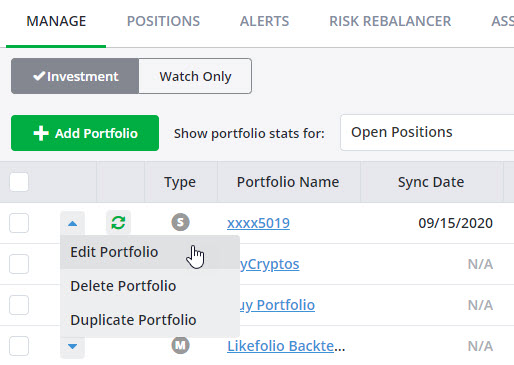
You can edit the portfolio name in the pop-up that appears.
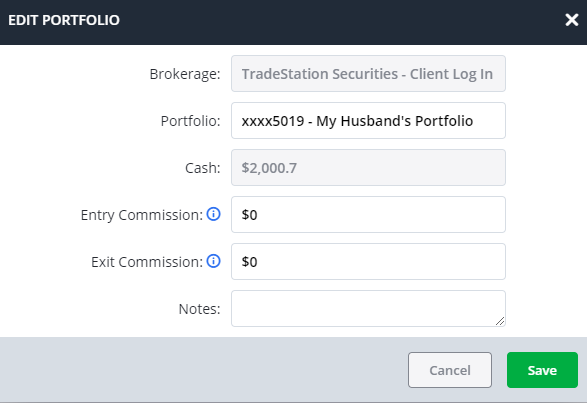
You may keep the account number and add a description at the end. In the example above, we added that our 5019 portfolio belongs to our husband.
Keeping the account number can be a great idea. It makes navigating any potential sync errors with your portfolio easy. Of course, you don’t have to do this. It’s completely up to you.
Just make sure to save your changes when you’re done.
*Note—The tabs and features you see on your TradeSmith Finance site will vary based on your subscription(s) and subscription level(s). The pictures in our Education Center articles are taken from a TradeSmith Platinum account.