
At some point, you may need to edit an alert. You might have entered something incorrectly or want to change something. Editing alerts is easy.
Click a ticker from the Positions page to be brought to the Asset Details Page.

Remember, the Asset details page several tabs. We’ll want to click the Alerts tab.

In our example above, we’ve set a VQ trailing stop. We’ll click the blue triangle in the alert box if we want to edit this alert. This opens an edit window.
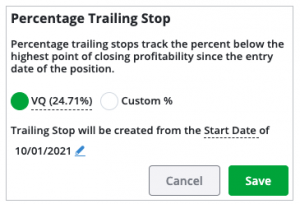
Here, we could change the VQ trailing stop to a custom trailing stop and change the start date.
Once we’ve made our edits, we’ll click Save.
The alert is then edited.
*Note—The tabs and features on your TradeSmith Finance site will vary based on your subscription(s) and subscription level(s). The pictures in our Education Center articles are taken from a TradeSmith Platinum account.