
At some point, you may need to move a position from one portfolio to another. This is easy to do. First, you can go to the Positions tab in My Portfolios.

Next, you can select the portfolio that has the position that needs to be moved.

This will bring up the list of positions for the selected portfolio.
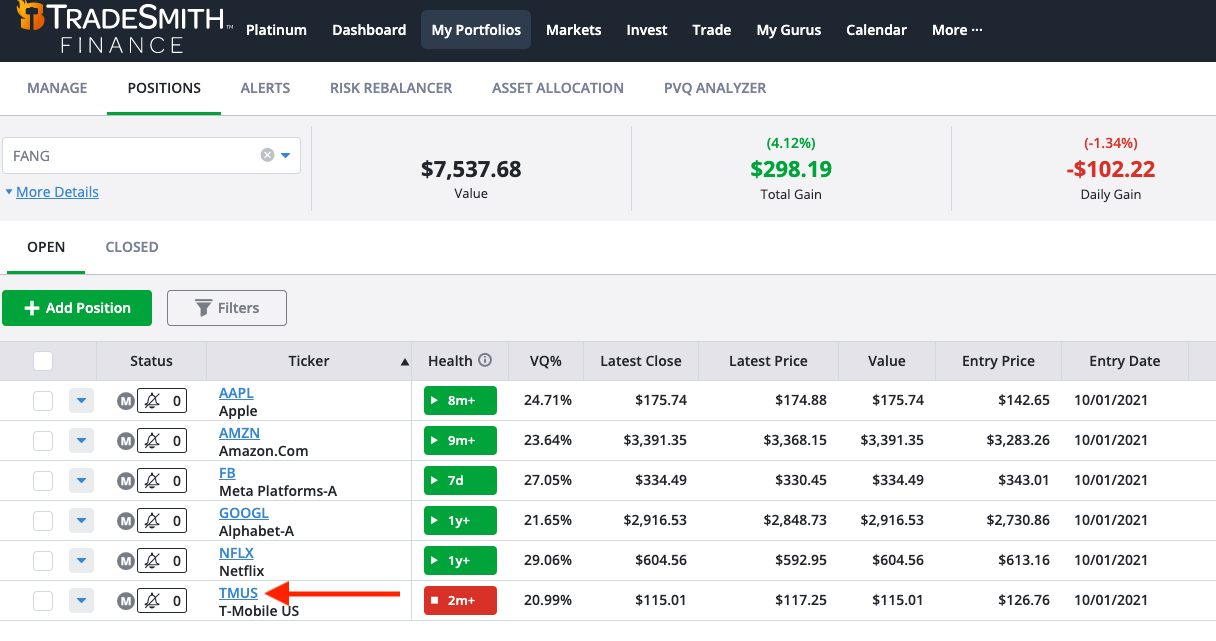
In the top left corner of our screenshot, we selected our FANG stocks portfolio. The FANG stocks include Facebook, Amazon, Apple, Netflix, and Google. However, we accidentally added T-Mobile (TMUS).
Let’s move T-Mobile. Click the small white box to the left of the ticker symbol (it’ll turn into a green checkmark). A menu will appear at the bottom of the screen.

Click Move to move your position. A pop-up box will appear and you can use the drop-down to select a different portfolio. Once you’ve selected the portfolio, click Ok. This position will then be moved to that new portfolio.

Keep in mind that positions cannot be moved from or to a synced portfolio.
*Note—The tabs and features you see on your TradeSmith Finance site will vary based on your subscription(s) and subscription level(s). The pictures in our Education Center articles are taken from a TradeSmith Platinum account.